Last updated: October 6, 2026
Xbox Controller Drift Fix: 9 Proven Methods That Actually Work
Table of Contents
ToggleThe 9 Real Causes — and How I’d Actually Solve Each One
You know the moment. You set the controller down, hands completely off it, and your character starts strolling left like they’ve got somewhere to be. Or the menu highlight keeps creeping upward on its own. That slow, uninvited drift is the single most common way a good Xbox controller starts to die.
Here’s the part nobody tells you up front: “drift” isn’t one problem. It’s about nine different problems that all produce the same annoying symptom, which is exactly why no single Xbox Controller Drift Fix works for every case — the right one depends entirely on which cause you’ve actually got. Cleaning a stick that has a scratched sensor track is like mopping a floor with a hole in it. So before you pop anything open, let’s figure out what you’re really dealing with.
Quick answer (read this first)
Drift showed up suddenly, overnight? Update the controller firmware in the Xbox Accessories app. Free, three minutes, fixes a surprising chunk of sudden-onset cases.
Controller still under a year old? Stop. Don’t open it. Claim the warranty and let Microsoft send you a new one — your time is worth more than a $4 part.
Out of warranty and it’s a dust/gunk issue? Compressed air first, then electronic contact cleaner under the stick. Cheap and effective.
Cleaned it twice and it keeps coming back? The sensor’s worn out. Swap the joystick module (soldering) or — my honest pick — buy a Hall-effect controller and never deal with this again.
One thing to never do: WD-40. I mean it. Keep reading.
Why this keeps happening (the 30-second version)
The standard Xbox thumbstick is a potentiometer—a little wiper arm dragging across a carbon track and translating stick position into a voltage. It’s clever, it’s cheap, and it wears out. Those modules are rated for roughly two million cycles, which sounds enormous until you realize a few months of Call of Duty or Rocket League burns through them fast.
Two things kill sticks. Dust and skin oil work their way under the rubber boot and stop the stick from re-centering cleanly. And the carbon track itself gets physically scratched over time, so the controller reads a signal even when the stick is dead center. That’s it. That’s the whole villain origin story.
Fun-but-annoying fact: Xbox controllers use the same Alps-made joystick modules as PlayStation controllers. So this isn’t a Microsoft-specific curse. It’s an industry-wide design that’s been quietly failing gamers for over a decade. The upside: once you know which of those two failure modes you’re facing, the right Xbox Controller Drift Fix usually takes minutes, not an afternoon.
Try this before you read another word
Plug your controller into a PC and open the Xbox Accessories app (or pull up any browser gamepad tester and watch the on-screen stick dots). Now take your hands completely off it.
Watch where the dots sit. If a stick’s dot rests off-center or wanders on its own, congratulations — you’ve confirmed the drift and pinned down exactly which stick and which direction. While you’re in there, check your firmware version too. You’re about to need both of those facts.
The Xbox Controller Drift Fix for Each of the 9 Causes
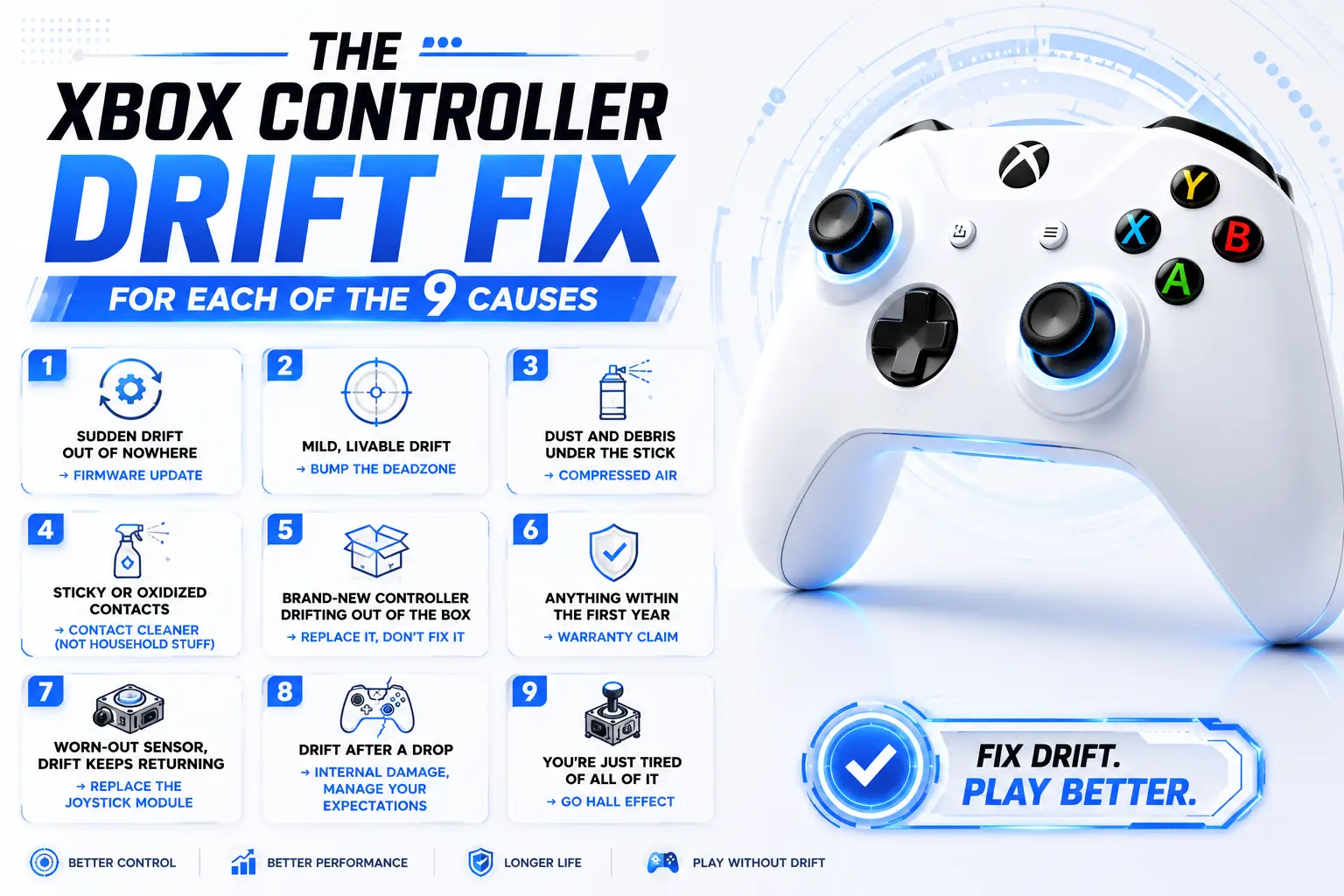
I’ve ordered these from “easiest, try it first” to “okay, we’re committing now.” Don’t skip ahead. Half the people who think they need a soldering iron actually needed a firmware update and a can of air.
1. Sudden drift out of nowhere → firmware update
If your controller was fine yesterday and drifting today, with no gradual buildup, there’s a real chance the cause is software, not worn hardware. Microsoft pushes firmware that adjusts how the controller interprets stick position, and a stale or glitchy calibration can masquerade as drift.
Open the Xbox Accessories app on your console or PC, connect via USB, and install any pending update. Three minutes. It won’t save a physically worn stick — but when drift appears abruptly, it’s the first thing I’d try.
2. Mild, livable drift → bump the deadzone
A deadzone is the little dead space around center where the controller ignores input. Widen it, and small drift gets swallowed before it reaches your game. In the Accessories app, go into the controller’s configuration and nudge the inner deadzone up until the phantom movement stops — usually a few percent does it.
Real talk: this is a band-aid, not a cure. A bigger deadzone means the stick travels further before the game responds, costing you a sliver of precision. Fine for casual play; in ranked, you’ll feel it. Use it to limp a controller to payday, nothing more.
3. Dust and debris under the stick → compressed air
This is the fix that saves the most controllers and takes the least effort. Grab a can of compressed air, aim the straw right at the base of the thumbstick where it meets the housing, and hit it with short bursts while working the stick around in full circles with your other hand. You’re blasting out the grit that’s keeping it from re-centering.
Keep the can upright — tip it and you’ll spray freezing liquid propellant onto the board, which is its own bad day. Cheap, fast, and it revives a shocking number of controllers people had already written off.
4. Sticky or oxidized contacts → contact cleaner (NOT household stuff)
Air didn’t fully do it? The gunk is stickier than dust — skin oil, soda residue, general life. Now you want a proper electronic contact cleaner (DeoxIT and BW-100 are the names to look for) or 99% isopropyl. A few drops at the base of the stick, work it in circles under the boot, then let it dry.
Here’s the mistake I see people make constantly, and it makes me wince every time: reaching for WD-40. Do not use WD-40. It’s not a cleaner, it’s a lubricant, and it leaves an oily film that attracts more dust and can wreck the electrical contact permanently. Household cleaners, same story. Contact cleaner or high-percentage isopropyl. Full stop.
5. Brand-new controller drifting out of the box → replace it, don't fix it
If a controller drifts within days of unboxing, that’s not wear — that’s a factory defect, a module that shipped miscalibrated. Do not clean it. Do not open it. Do not “fix” it.
Return it. If you bought from a retailer, their 30-day return is usually faster than Microsoft’s process, so start there. You paid for a working controller and didn’t get one — that’s the store’s problem, not yours.
6. Anything within the first year → warranty claim
This is the single most under-used Xbox Controller Drift Fix, and it’s completely free. Retail Xbox controllers in the US carry a one-year limited warranty, and Microsoft extended the Elite Series 2 to a full year after a class-action headache over — you guessed it — drift.
If your drift showed up inside that window and there’s no obvious drop damage, go to support.xbox.com, register the serial number, and request a replacement. Microsoft sends a prepaid shipping label and mails you a repaired or new unit, typically in one to three weeks. One catch worth bracing for: if your exact color’s out of stock, you might get a different one back.
So should you always solder your own fix to save money? Not even close. If you’re in warranty, opening the controller to save a $4 part is throwing away a free replacement. Claim it.
7. Worn-out sensor, drift keeps returning → replace the joystick module
Here’s the tell that cleaning will never hold: you clean the stick, it’s perfect for a week, then the exact same drift crawls back. That means the carbon track is scratched, not dirty. Cleaning removes dust; it can’t un-scratch a worn surface.
The permanent DIY fix is swapping the whole joystick module. The parts are dirt cheap — a few dollars — but installation means desoldering and resoldering roughly 14 points per module, so it’s an intermediate soldering job, not a beginner one. If you own an iron and you’re steady, it’s very doable. If you’ve never soldered, don’t learn on your only controller.
8. Drift after a drop → internal damage, manage your expectations
Dropped it on a hard floor and the drift started right after? Different animal. Impact can shift or crack internal parts, and no amount of cleaning or recalibration undoes bent metal. You can open it, look for anything obviously dislodged, and reseat or replace the module — but be honest about whether a standard controller is worth that effort versus just replacing it. Often it isn’t.
9. You're just tired of all of it → go Hall effect
If you’ve fixed drift on the same controller more than once, or you burn through controllers every year, stop patching a broken design. Hall-effect sticks use magnetic sensing instead of a physical wiper on a carbon track — nothing scrapes, so the wear-based drift you’ve been fighting simply can’t happen the same way.
Two paths. You can buy aftermarket Hall-effect modules that are pin-compatible with the Xbox board and solder them in, turning your existing controller drift-proof. Or — and this is what I’d tell most people — just buy a controller that ships with Hall-effect sticks. Officially licensed options like the GameSir G7 SE exist for around the price of a standard pad. It’s the closest thing to a real cure this whole category has.
Which fix is actually right for you?
Did the drift appear suddenly, overnight?
→ Firmware update first (issue 1). Then a deadzone bump (issue 2) if it lingers.
Is the controller less than a year old, no drop damage?
→ Warranty claim (issue 6). A free replacement beats your labor. Don’t overthink it.
Brand new, drifting immediately?
→ Return or replace it (issue 5). It’s defective; that’s not your job to repair.
Out of warranty, drift comes and goes?
→ Compressed air, then contact cleaner (issues 3–4). Give cleaning exactly one honest shot.
Cleaned it already and it came back?
→ The track’s worn. Module swap if you can solder (issue 7); Hall-effect controller if you can’t (issue 9).
Sick of doing this every single year?
→ Hall effect. Stop feeding the cycle (issue 9).
Is the controller less than a year old, no drop damage?
→ Warranty claim (issue 6). A free replacement beats your labor. Don’t overthink it.
Brand new, drifting immediately?
→ Return or replace it (issue 5). It’s defective; that’s not your job to repair.
Out of warranty, drift comes and goes?
→ Compressed air, then contact cleaner (issues 3–4). Give cleaning exactly one honest shot.
Cleaned it already and it came back?
→ The track’s worn. Module swap if you can solder (issue 7); Hall-effect controller if you can’t (issue 9).
Sick of doing this every single year?
→ Hall effect. Stop feeding the cycle (issue 9).
Fix-at-a-glance
| Fix | Cost | Difficulty | What it actually fixes | Permanent? |
|---|---|---|---|---|
| Firmware update | Free | Easy (3 min) | Sudden, software-side drift | Sometimes |
| Deadzone increase | Free | Easy | Masks mild drift | No — band-aid |
| Compressed air | ~$8 | Easy | Dust under the stick | Weeks–months |
| Contact cleaner / 99% IPA | ~$10 | Medium | Sticky, oxidized contacts | Months |
| Warranty replacement | Free | Easy* | Anything, in the first year | Yes (new unit) |
| Joystick module swap | ~$5 part | Hard (solder) | Worn / scratched sensor | Until it wears again |
| Hall-effect module | ~$20 | Hard (solder) | Everything — drift-proof | Yes |
| New Hall-effect controller | ~$40+ | None | Everything — drift-proof | Yes |
* Easy only if you’re inside the one-year window.
Where I'd push back on the usual advice
A few things the tutorials gloss over — because not every Xbox Controller Drift Fix you’ll read about online actually holds up.
“Just recalibrate it” is oversold. Xbox doesn’t hand you a full stick-recalibration wizard the way PlayStation does. What you’ve actually got is firmware updates and deadzone adjustment. Both help specific cases. Neither one regrows a worn carbon track, and it’s frustrating to watch people cycle through software settings for an hour on a stick that’s physically done.
Soldering your own module is real, but respect it. The part is cheap; the skill isn’t. Fourteen-ish points on a dense board, and one lifted pad or bridged connection turns a drifting controller into a dead one. Practice on something you don’t care about first. I’m not gatekeeping — I just don’t want you learning on your main pad.
The right-to-repair sticker thing. In the US, “warranty void if removed” stickers aren’t legally enforceable — opening the shell doesn’t automatically void your coverage. But that only matters out of warranty. If you’re still inside the window, the smart move isn’t to invoke your repair rights; it’s to make Microsoft ship you a new one for free.
Hall effect isn’t literally immortal. It kills the carbon-wear failure mode behind most drift, which is huge — but bumpers, triggers, and batteries still age. Buy it because it solves this problem, not because it’s a magic forever-pad.
A 60-second pre-flight checklist
Before you spend a dollar or pick up a tool, tick these off:
☐ I ran a gamepad test and confirmed which stick and which direction is drifting
☐ I checked whether the controller is still under its one-year warranty
☐ I updated the firmware in the Xbox Accessories app (free, first thing)
☐ I know whether the drift came on suddenly (lean software) or gradually (lean hardware)
☐ If it’s brand new, I’m returning it, not repairing it
☐ I have contact cleaner or 99% isopropyl on hand — and specifically not WD-40
☐ If I’m soldering, I’ve accepted the risk and I’m not learning on my only controller
FAQ
Does updating the firmware really fix drift, or is that a myth?
For sudden-onset drift, it genuinely helps a meaningful share of cases — the controller was mis-reading center, and the update corrects that. For drift that crept in gradually over months, firmware won’t save you; the problem is physical wear. But it’s free and takes three minutes, so always rule it out first.
Will bumping up the deadzone hurt my aim?
Yes, a little, and you should know that going in. A wider deadzone means the stick travels further before your game registers input, which slightly dulls precision and response. It’s a fair trade to keep a controller usable, but it’s a compromise, not a repair.
Can I just use the rubbing alcohol from my bathroom cabinet?
The 70% stuff will work in a pinch, but it’s mostly water and dries slower and dirtier. Spring for 99% isopropyl or a proper electronic contact cleaner — it flushes the contacts and evaporates clean, which is the entire point.
Is WD-40 ever okay, even a tiny bit?
No. Never. It’s a lubricant, not a cleaner; it leaves an oily residue that attracts dust and can permanently foul the contacts. If someone in a forum swears it fixed theirs, they’ve just delayed a worse failure.
My Elite Series 2 drifts — is it any different from a standard controller?
Same joystick modules, same failure mode, so the same fixes apply. The one difference in your favor: Microsoft extended Elite Series 2 warranty coverage to a full year after drift complaints, so check your purchase date before assuming you’re out of luck.
How long should an Xbox controller realistically last?
For heavy players, plan for drift somewhere in the one-to-two-year range on standard sticks — that’s just the nature of the potentiometer design. Lighter use stretches it out. If that lifespan annoys you as much as it annoys me, that’s the argument for Hall effect in a nutshell.
Are Hall-effect sticks actually drift-proof forever?
They’re immune to the carbon-track wear that causes the common drift you’re fighting, because nothing physically scrapes. That’s the big win. They’re not indestructible overall — but the specific problem that brought you to this article? Gone.
Yes, a little, and you should know that going in. A wider deadzone means the stick travels further before your game registers input, which slightly dulls precision and response. It’s a fair trade to keep a controller usable, but it’s a compromise, not a repair.
The 70% stuff will work in a pinch, but it’s mostly water and dries slower and dirtier. Spring for 99% isopropyl or a proper electronic contact cleaner it flushes the contacts and evaporates cleanly , which is the entire point.
No. Never. It’s a lubricant, not a cleaner; it leaves an oily residue that attracts dust and can permanently foul the contacts. If someone in a forum swears it fixed theirs, they’ve just delayed a worse failure.
Same joystick modules, same failure mode, so the same fixes apply. The one difference in your favor: Microsoft extended Elite Series 2 warranty coverage to a full year after drift complaints, so check your purchase date before assuming you’re out of luck.
They’re immune to the carbon-track wear that causes the common drift you’re fighting, because nothing physically scrapes. That’s the big win. They’re not indestructible overall but the specific problem that brought you to this article? Gone.
What I'd actually do
If I handed this to a friend, the whole decision fits in a breath: In warranty? Claim it. New out of the box? Return it. Out of warranty with a dust problem? One round of air and contact cleaner, and if the drift crawls back within a week or two, quit cleaning — the sensor’s scratched and you’re just delaying the inevitable.
And if you’ve been through this dance more than once on the same pad, I’d stop being stubborn about it. The only permanent Xbox Controller Drift Fix worth betting on long-term is Hall effect — swap in the modules yourself if you like soldering, or spend forty-ish bucks on a controller that ships with them and be done. There’s a point where fixing the same drift over and over isn’t thriftiness — it’s choosing to keep the problem. Don’t. Go play something.
Gaming Musk Team creates gaming tools and practical guides for gamers. We build tools like PC requirement checkers, gamepad testers, and game-specific calculators while publishing easy-to-follow guides for games, gaming hardware, and performance optimization. Our goal is to help players make better gaming decisions with accurate tools and reliable information.