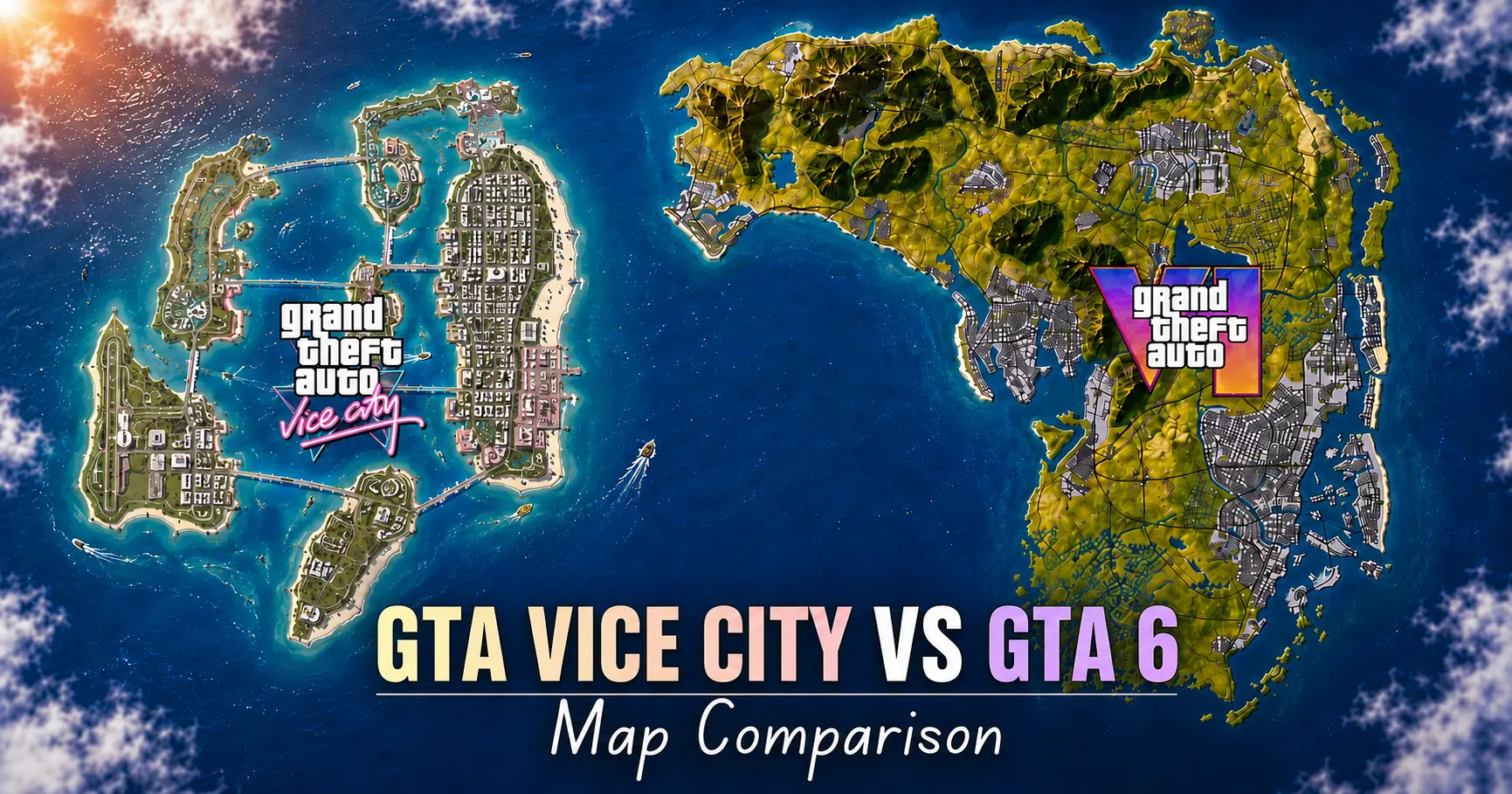
GTA 6 Map Comparison: How Much Bigger Is Leonida Than Every Previous GTA Map?
Quick Answer
GTA 6’s map, set in the state of Leonida,
is on track to be the biggest in series history. Community mapping projects suggest it’s somewhere between 2 and 2.6 times larger than GTA 5’s Los Santos and Blaine County combined.
Nothing’s official yet,
but if raw scale is what you care about, this GTA 6 map comparison already has a winner. If tight, purposeful city design is your thing, GTA 3 and Vice City still teach lessons GTA 6 has to prove it learned.
Here’s why this matters beyond bragging rights. A bigger map isn’t automatically a better one. Anyone who drove forty empty minutes across Blaine County backroads in GTA 5 just to reach a mission marker knows that “why is this here” feeling. This gta 6 map comparison treats size as one column, not the only one.
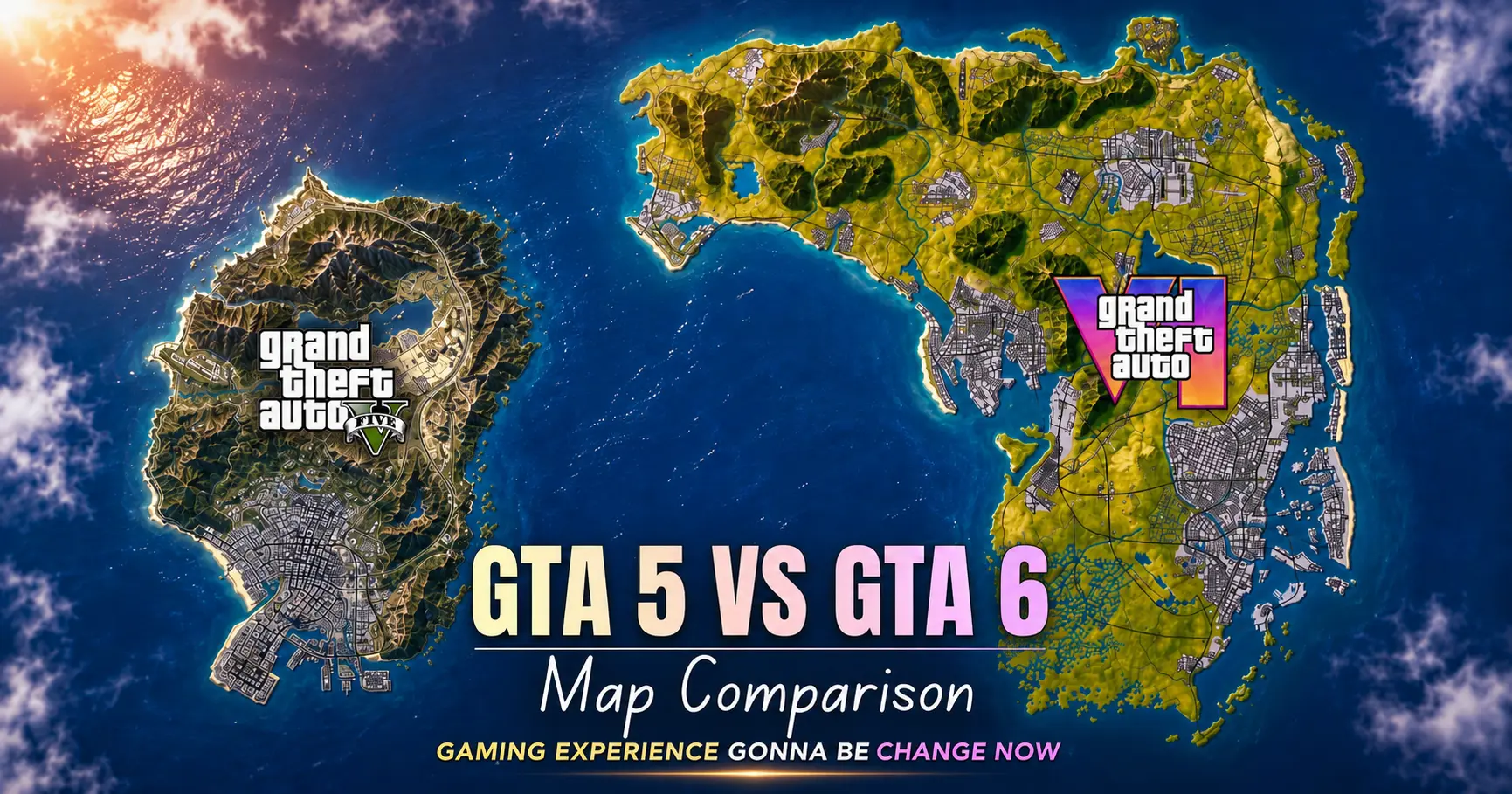
GTA 5 Map vs GTA 6 Map
Los Santos and Blaine County covered roughly 49 square miles and held up for over a decade. Leonida, based on numbers fan cartographers pieced together from trailer footage, looks to land north of double that, possibly closer to 2.5x depending on whose math you trust.
What’s different isn’t just acreage. GTA 5 leaned on one sprawling city plus a sparser countryside built for heist getaways. GTA 6 appears to split attention across a real city core, swampland in the Leonida Keys, small towns, and coastline running the map’s full length. More distinct biomes, packed closer together if Rockstar nails the transitions, the extra size should feel earned instead of a headline number.
Draw distance matters too a big map only feels big if you can see it, and the trailer’s skyline shots suggest Rockstar solved the pop-in problem that plagued GTA 5’s last-gen era.
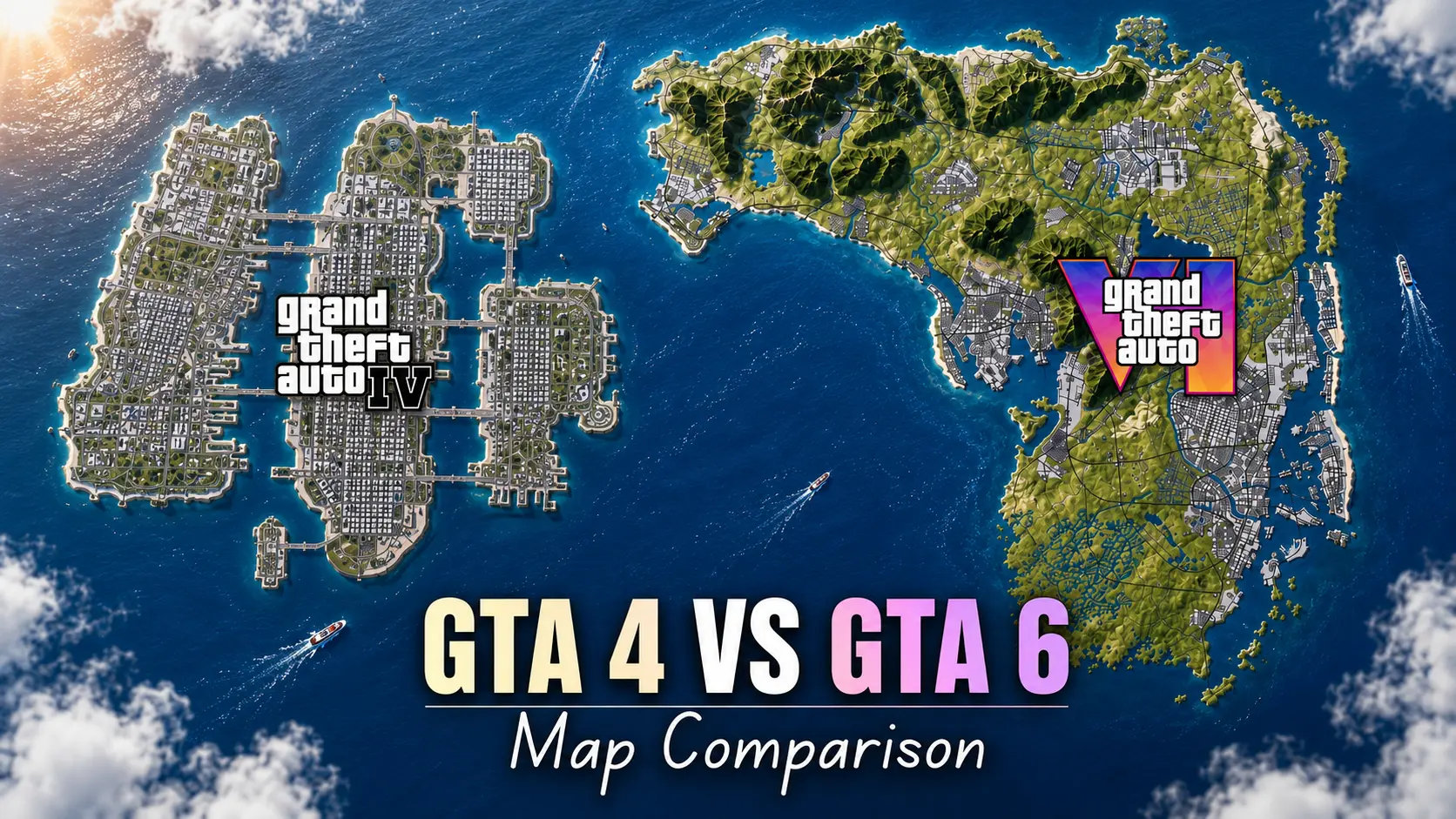
GTA 4 Map vs GTA 6 Map
Liberty City in GTA 4 gets forgotten in most gta 6 map comparison talk, which is unfair. Smaller than San Andreas, sure, but it was the densest, most detailed city the series had built narrow streets, elevated trains, alleyways that felt real.
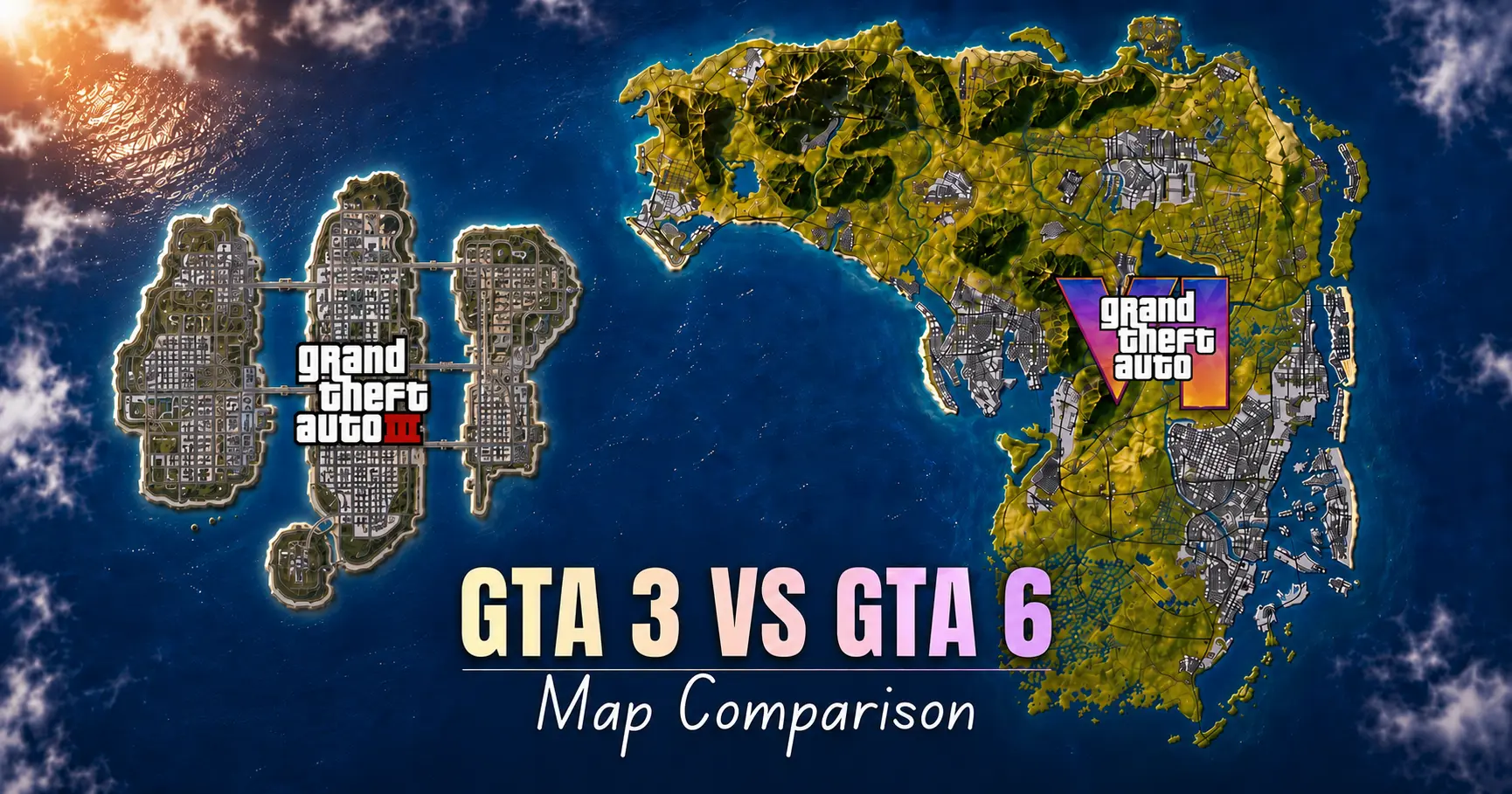
GTA 3 Map vs GTA 6 Map
Boot up GTA 3 today (seriously, try it) and the map feels quaint three islands, no swimming, missions unlocked by driving over a bridge that used to be blocked off. Tiny by modern standards. But it proved a fully 3D, drivable, shootable city could work, so sizing it against GTA 6 feels beside the point.
Where the comparison holds up is intent. GTA 3’s Liberty City made every neighborhood feel distinct despite 2001 hardware limits. GTA 6 has far more horsepower, but that same instinct make every district feel like somewhere, not just somewhere to drive through is doing the heavy lifting again.
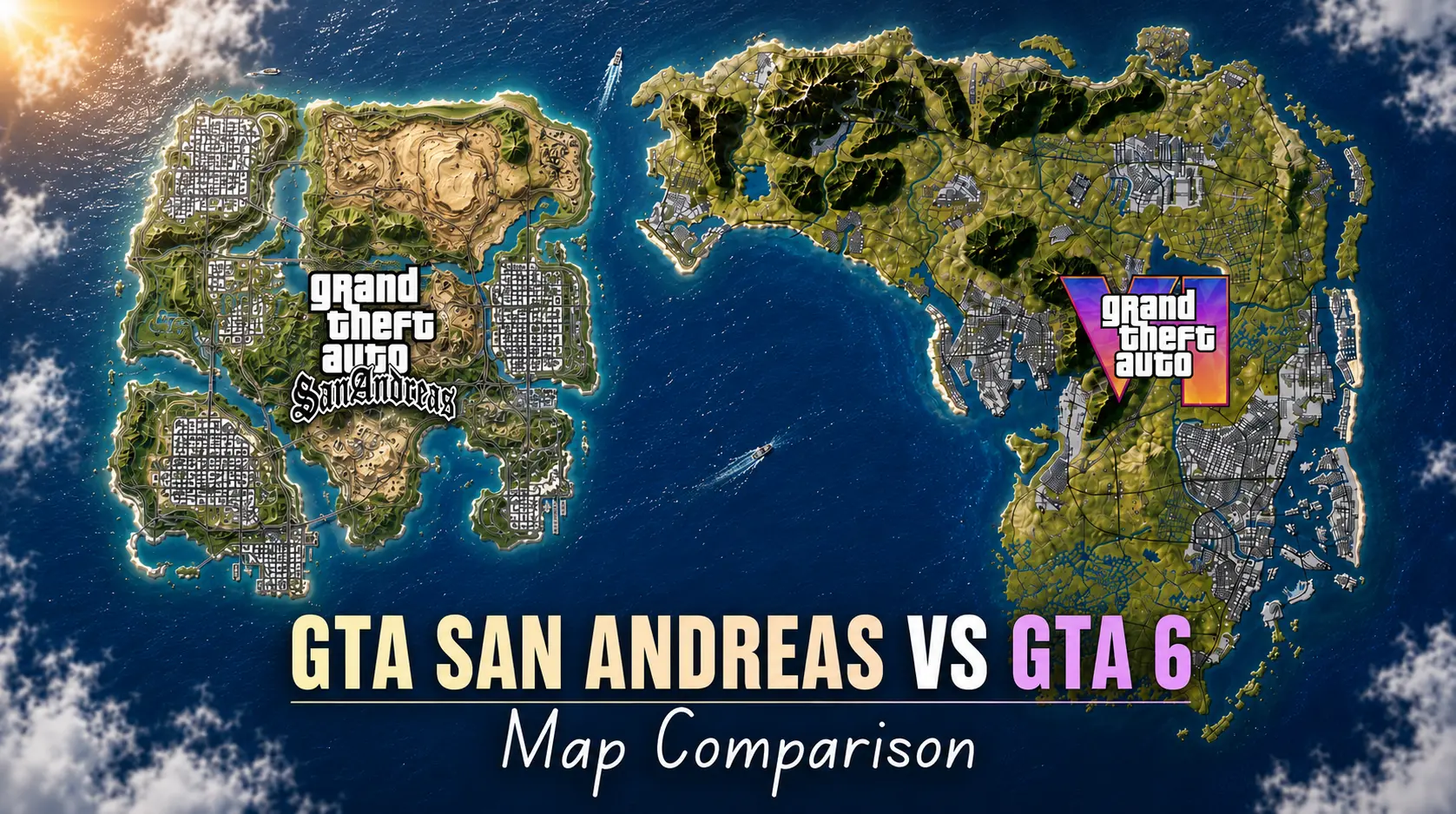
GTA San Andreas Map vs GTA 6 Map
San Andreas held the “biggest GTA map” title for nineteen years by cramming three cities Los Santos, San Fierro, Las Venturas plus wilderness and desert into one state. It was the last mainline game to lean into “whole state, not one city,” and GTA 6 is clearly picking that thread back up rather than GTA 5’s single-metro approach.
The honest gap: San Andreas’ extra size came partly from empty desert stretches built more for scale than content. Early GTA 6 breakdowns suggest Rockstar wants to avoid that trap by making the Leonida Keys swampland functional wildlife, hidden locations, actual reasons to detour. Whether that holds up at launch, nobody can fully answer yet.
GTA Vice City Map vs GTA 6 Map
This is the one everyone actually wants, since GTA 6 returns to the same city by name. The original 2002 Vice City was compact two islands, one bridge and it took maybe fifteen minutes to learn cold. That was the point: memorize the layout fast, focus on the story and the neon-soaked vibe.
GTA 6’s Vice City won’t be that small, but the DNA seems intentional. Trailer shots show the same beachfront skyline and art deco cues, with a downtown layout that rhymes with 2002 while surrounding it with far more territory. Less a remake, more Vice City used as the anchor point of a bigger world smarter than blowing the original up ten times over and losing what made it recognizable.
GTA Liberty City Stories Map vs GTA 6 Map

This one barely comes up in gta 6 map comparison content, which is a shame. Liberty City Stories on PSP reused GTA 3’s map but restructured traffic and interiors, making an old space feel fresh on weaker hardware. Proof that map size is only half the equation the other half is what players can do inside the space already built.
GTA 6 isn’t reusing an old map, but leaked details about interactive interiors, NPC schedules, and shifting weather suggest a similar philosophy. Any gta 6 map comparison worth reading has to account for that a map this size only works if Rockstar makes the space do more, not just look bigger on a loading screen.
Quick Self-Check Before You Keep Comparing
Run this gut check before moving into trade-offs:
● Do you care more about square kilometers than what’s happening inside them? GTA 6 already wins your bracket on paper.
● Did you replay GTA 3 or Vice City recently because the map felt tight and readable? Density beats scale for you.
● Do you tab out mid-drive when the road gets boring? Biome variety matters more than the headline number.
● Checked whether your setup could even run this? There’s no confirmed PC release yet, so a PC checker against rumored specs is guesswork worth bookmarking, not panicking over.
So does a bigger number automatically mean a better game? Not exactly. It just changes what kind of GTA experience you’re signing up for.
Map Size at a Glance
| Game |
Approx. Map Size vs GTA 6 |
Design Strength |
| GTA 6 (Leonida) |
Baseline — largest to date |
Scale, biome variety, draw distance |
| GTA 5 |
~2–2.6x smaller |
One dense metro + open country |
| GTA 4 |
Smaller, but denser core |
Urban texture and verticality |
| San Andreas |
Smaller overall |
Multi-city, whole-state structure |
| Vice City |
Far smaller |
Tight, memorable single-city layout |
| GTA 3 |
Far smaller |
Proof-of-concept 3D open world |
| Liberty City Stories |
Smallest (reused GTA 3 map) |
Making an old space feel new |
Where This Article Pushes Back
Here’s the part most hype posts skip. Nobody outside Rockstar has confirmed exact measurements for GTA 6. Every figure floating around the 2x, the 2.5x, the “125 square kilometers” claims comes from community mapping projects working off trailer footage and leaked assets. Treat those as informed estimates, not carved-in-stone facts.
It’s also worth pushing back on the assumption that bigger always beats better. San Andreas proved extra square mileage can dilute a game as easily as enhance one. GTA 6 has the hardware and six mainline entries’ worth of design lessons to avoid that trap — but “should avoid it” and “will avoid it” are different sentences until reviewers get hands-on time.
One more thing worth saying plainly: there’s still no confirmed PC version at launch. If a PC checker is part of your planning, hold off Rockstar hasn’t published requirements since there’s no announced PC window yet.
Frequently Asked Questions
Is the GTA 6 map bigger than GTA 5's?
Based on community mapping and leaked assets, yes most estimates put it between double and two-and-a-half times larger, though Rockstar hasn’t released an official figure.
Will GTA 6 include more than one city?
Yes. Vice City sits at the center, with smaller towns, swampland in the Leonida Keys, and rural stretches around it similar in spirit to how San Andreas handled its state-wide layout.
Can I play GTA 6 on PC at launch?
Not currently. There’s no confirmed PC release date or system requirements, and historically Rockstar has brought titles to PC one to two years after console launch.
Does a bigger map mean longer loading times?
Not necessarily. Rockstar’s messaging has emphasized faster load times and improved draw distance, which works against the usual “bigger map, slower game” assumption.
Which older GTA map is most similar to what GTA 6 is going for?
San Andreas is the closest structural sibling multiple towns and biomes inside one state but with Vice City’s original layout used as the emotional anchor point.
Still have questions? Visit our Contact Us page, and we’ll be happy to help.
Gaming Musk Team creates gaming tools and practical guides for gamers. We build tools like PC requirement checkers, gamepad testers, and game-specific calculators while publishing easy-to-follow guides for games, gaming hardware, and performance optimization. Our goal is to help players make better gaming decisions with accurate tools and reliable information.
The Best GPU for Gaming in 2026 (Tested, Argued Over, and Finally Settled)
Graphics cards get swapped in and out of test rigs constantly around here with a Torx driver in one hand and a half-eaten sandwich in the other, more often than not. Streamers’ builds, thermal paste jobs gone wrong, arguments online about whether 8GB of VRAM is “fine, actually.” (It is not.) When someone asks what the best gpu for gaming 2026 has to offer, the honest answer used to be a single card name. Not anymore. The market split into lanes, and pretending there’s one universal winner does readers a disservice.
Here’s a scenario that sums up the current landscape: someone wants to upgrade an aging rig, budget capped at $400, and asks if that’s even possible anymore. It is. But the GPU that makes sense for that build looks nothing like the card worth recommending to someone chasing 4K ray tracing, and neither looks like the pick for someone who also wants to run a local AI model on the side. Three different people, three correct answers that’s the whole premise behind picking the best gpu for gaming 2026, rather than chasing one overall champion.
Quick Answer: Best GPU for Gaming 2026 in Under 10 Seconds
If you’re skimming, here’s the gut-check version:
| Use Case |
Pick |
Why |
| No-compromise / flagship |
RTX 5090 |
32GB VRAM, 150+ FPS at 4K with frame gen |
| Best high-end value |
RTX 5080 / RX 9070 XT |
Near-flagship 4K performance at a lower cost |
| Best all-around pick |
RTX 5070 |
Strong 1440p performance, ages well, and runs cooler |
| Best budget GPU |
RX 9060 XT 16GB |
Best VRAM-per-dollar right now |
| Best sub-$300 budget pick |
Intel Arc B580 |
12GB VRAM with rougher drivers |
| Best for AI + gaming |
RTX 5070 Ti / RTX 4090 |
Enough VRAM for local models without sacrificing gaming performance |
If none of that means anything yet, keep reading it will shortly.
Why This Decision Actually Matters Right Now
Games aren’t behaving the way they used to. Textures are heavier, ray tracing is closer to a default expectation than an optional toggle, and upscaling tech DLSS 4 on NVIDIA’s side, FSR 4 on AMD’s — has quietly become load-bearing infrastructure rather than a nice bonus. Buy the wrong card and you won’t just lose frame rate; you’ll lose VRAM headroom sooner than you should have, and that’s the mistake that comes up most often when someone skips thinking through what the best gpu for gaming 2026 actually means for their setup. Someone buys an 8GB card thinking it’ll last, and before long they’re dropping texture settings on games that should look gorgeous.
Games aren’t behaving the way they used to. Textures are heavier, ray tracing is closer to a default expectation than an optional toggle, and upscaling tech DLSS 4 on NVIDIA’s side, FSR 4 on AMD’s has quietly become load-bearing infrastructure rather than a nice bonus. Buy the wrong card and you won’t just lose frame rate; you’ll lose VRAM headroom sooner than you should have, and that’s the mistake that comes up most often when someone skips thinking through what the best gpu for gaming 2026 actually means for their setup. Someone buys an 8GB card thinking it’ll last, and before long they’re dropping texture settings on games that should look gorgeous.
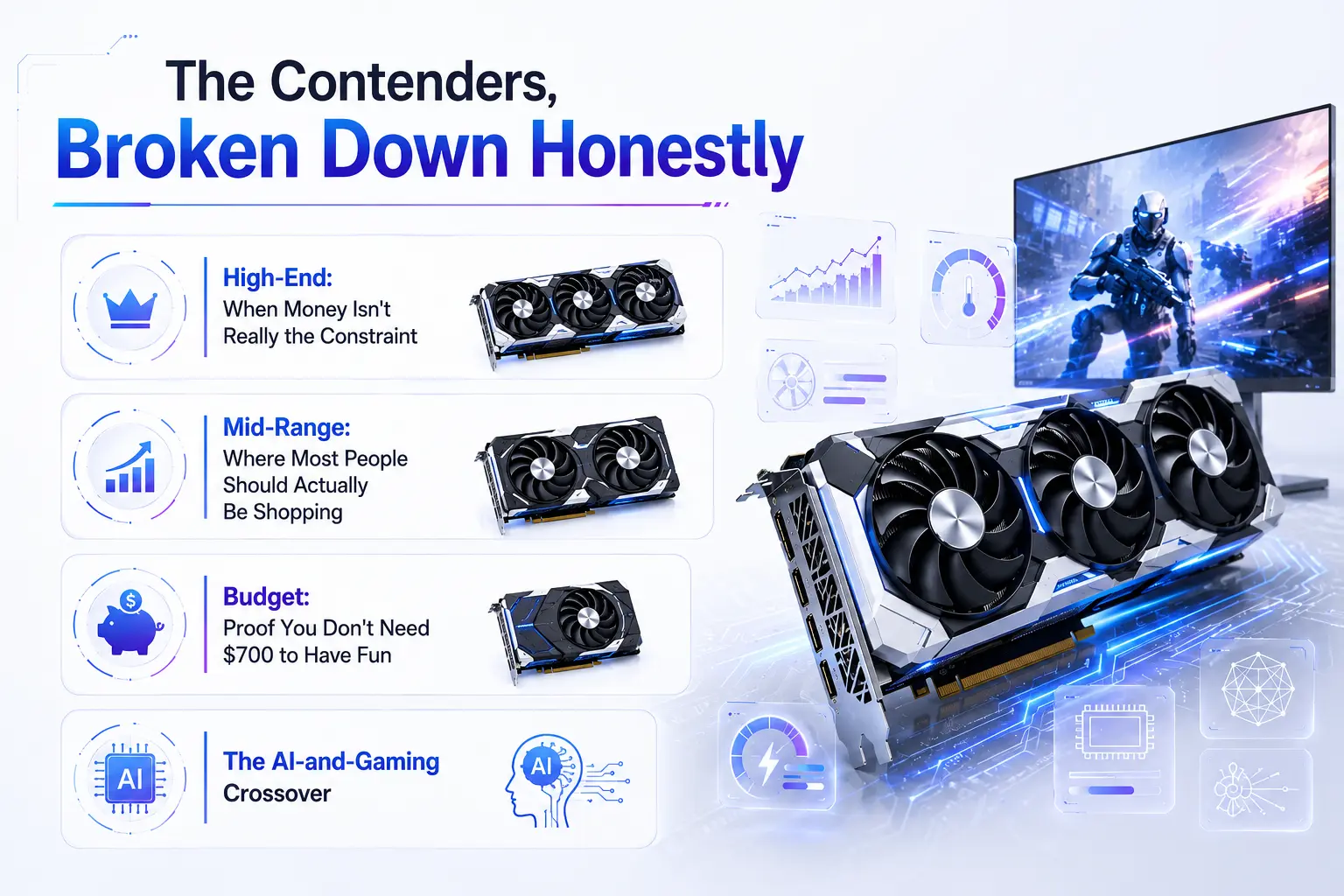
The Contenders, Broken Down Honestly
High-End: When Money Isn't Really the Constraint
Anyone chasing the absolute best gpu for gaming 2026 flagship-wise lands here first, before deciding whether that ceiling is worth the cost.
The RTX 5090 sits at the top for a reason 32GB of GDDR7 and enough horsepower to push past 150 FPS in demanding 4K titles when paired with frame generation. It’s also power-hungry enough that a PSU upgrade often becomes a hidden second purchase just to run one safely. That’s a real cost most GPU rankings skip over.
Right below it, the RTX 5080 gives up relatively little for a noticeably smaller price tag, and the RX 9070 XT trades some ray-tracing polish for AMD’s usual value edge roughly 95% of RTX 5070 Ti performance for closer to 80% of the price.
Mid-Range: Where Most People Should Actually Be Shopping
This is the tier that generates the most debate when people ask about the best gpu for gaming 2026 in a realistic price range, because it’s genuinely close. The RTX 5070 has become a go-to recommendation for anyone asking about the best gaming gpu 2026 offers without flagship spending 12GB of GDDR7, ultra settings above 100 FPS in current titles, and enough multi-frame-generation headroom to push well past that in supported games. It also runs cooler than its predecessor, which sounds minor until you’re the one whose case fans scream during a long session.
AMD’s RX 9070 counters with near-identical rasterized performance at a lower price, minus some software polish. If ray tracing isn’t your priority, that’s an easy trade.
Budget: Proof You Don't Need $700 to Have Fun
Here’s where things get genuinely interesting, and where a lot of “best gpu for gaming 2026” roundups get lazy. The best budget gpu for gaming 2026 conversation really comes down to three names: the RX 9060 XT 16GB, the RTX 5060 Ti, and the Intel Arc B580.
The RX 9060 XT at roughly $350-400 outperforms the base RTX 5060 by a noticeable margin in raw rasterization and ships with 16GB of memory instead of 8GB a gap that matters more with every new game that comes out. A side-by-side test against a base 5060 in the same rig, same monitor, showed the difference clearly in Dragon’s Dogma 2: the AMD card pulled close to ten frames ahead at 1080p.
The Intel Arc B580 remains the scrappy underdog. At under $300 with 12GB of VRAM, it’s the best budget gaming gpu 2026 has for anyone willing to tolerate occasionally clunky drivers in exchange for memory no other card at that price offers. It’s worth keeping one around in a testing rig just to stay honest about Intel’s progress not flawless, but no longer the punchline it once was.
The AI-and-Gaming Crossover
A growing number of people are asking a different question now: what’s the best gpu for ai and gaming 2026 if they want to run local language models on the same machine they game on? The honest answer is that VRAM decides almost everything here. A 7B model at reasonable quantization needs around 5-6GB, but 14B-class models want closer to 10-11GB, and anything bigger eats into territory only 16GB-plus cards handle comfortably.
For that dual-purpose buyer, the RTX 5070 Ti or, budget allowing, the RTX 4090 make the most sense — both hold mid-size models without sacrificing gaming performance, and NVIDIA’s CUDA ecosystem still has the smoothest support for tools like Ollama and LM Studio. AMD cards can do this work through ROCm, but it’s not nearly as plug-and-play.
Try This Before You Keep Reading
Quick exercise open your PC’s specs (Task Manager on Windows, or any PC checker tool if you’re not sure what’s installed) and note your GPU model, PSU wattage, and current VRAM. Compare that VRAM number against the games you actually play. Sitting on 8GB and regularly playing today’s bigger titles? That’s your answer on whether an upgrade is overdue.
Which One Is Actually Right For You (Best GPU for Gaming 2026, By Use Case)
• Play competitive esports almost exclusively → RTX 5060 Ti or Arc B580. You don’t need more.
• Targeting 1440p, want lasting headroom → RTX 5070 or RX 9070.
• 4K and ray tracing are non-negotiable → RTX 5080 minimum, RTX 5090 if budget allows.
• Budget caps around $300-400 → RX 9060 XT 16GB or Arc B580, depending on driver polish versus VRAM.
• Gaming and local AI experiments share one machine → RTX 5070 Ti or RTX 4090, full stop.
Where This Take Pushes Back on the Crowd
Here’s a genuine disagreement with the popular pick: the RTX 5060 (the plain, non-Ti, 8GB version) is overrated for how often it gets recommended to first-time builders. It’s fine right now. It won’t stay that way, and enough of these cards get replaced early for frustrated owners to say so directly. Spend the extra fifty dollars on the Ti version, or step down to the RX 9060 XT instead the 16GB buffer buys real, lasting usability.
There’s also little patience for AMD’s marketing language around its 8GB and 16GB variants being “the same GPU, no compromise.” Reviewers who’ve torn into that claim found the compromise real and measurable. Don’t take a manufacturer’s word for it — check independent benchmarks before buying either variant.
Quick Checklist Before You Buy
☐ Confirmed your monitor’s real resolution and refresh rate (don’t buy for 4K on a 1080p panel)
☐ Checked PSU wattage against the card’s rated draw, with headroom to spare
☐ Measured case clearance for the card’s physical length
☐ Decided whether ray tracing and DLSS/FSR quality justify NVIDIA’s premium
☐ Looked at VRAM needs for your actual game library, not just today’s price tag
☐ Run a PC checker or system scan to confirm current specs before ordering
The Actual Closing Take
Stop hunting for one magic answer to the best gpu for gaming 2026 question and start being honest about what you actually play and what you can spend. Plenty of people overspend on a 5090 for a library full of CS2 and Valorant, and just as many stretch a dying 8GB card well past its expiration date to save a couple hundred bucks. Neither approach ages well. Figure out your resolution, be realistic about budget, run a quick PC checker if you’re unsure what you’re working with, and buy the card matching the games you’ll actually load up tonight not the one that looks best on a spec sheet.
FAQ
Is it worth waiting for next-gen cards instead of buying now?
Depends on your setup. A card struggling to hit 60 FPS today costs you real enjoyment while you wait on uncertain future savings. If your current card still handles your games fine, there’s less urgency.
Does more VRAM always mean better gaming performance?
No VRAM prevents stutter and texture pop-in once you exceed capacity, but it doesn’t add raw horsepower on its own. A card can have huge memory and still run slow if the underlying chip is weak.
Can a budget card handle ray tracing at all?
Somewhat, at lower settings. Don’t expect the smooth experience flagship cards deliver, but entry cards with upscaling support can produce a playable result in lighter titles.
Should a first-time builder just buy whatever's cheapest?
Not necessarily the cheapest card in a lineup is often the one with cut VRAM or an outdated architecture, which shortens its useful life fastest.
Is AMD's driver software still a real concern?
It’s improved considerably, though some users still report occasional quirks compared to NVIDIA’s more mature control panel and driver cadence.
Does the CPU bottleneck a new GPU purchase?
It can, especially older CPUs paired against high-end cards. An aging processor next to a flagship GPU often wastes a chunk of that card’s potential.
Still have questions? Visit our Contact Us page, and we’ll be happy to help.
Gaming Musk Team creates gaming tools and practical guides for gamers. We build tools like PC requirement checkers, gamepad testers, and game-specific calculators while publishing easy-to-follow guides for games, gaming hardware, and performance optimization. Our goal is to help players make better gaming decisions with accurate tools and reliable information.
Palworld Jormuntide Ignis Breeding Guide: Best Breeding Combo & Passive Skills
Getting your first Jormuntide Ignis isn’t difficult once you know the correct breeding combination, but many players waste hours pairing the wrong Pals and burning through valuable Cake before realizing their mistake. If you’re looking for the fastest way to breed this powerful Dragon/Fire Pal, this Palworld Jormuntide Ignis breeding guide covers everything you need to know.
You’ll learn the exact breeding combo, the requirements for your Breeding Farm, how to breed better passive skills, common mistakes to avoid, and whether breeding is actually faster than catching one in the wild.
How to Get Jormuntide Ignis in Palworld by Breeding (Quick Answer)
Breed Blazehowl and Jormuntide in a Tech Level 19 Breeding Farm, stocked with Cake, and you’ll get a Jormuntide Ignis egg directly. No multi-generation chain required. That’s the entire trick. If you already own a Jormuntide Ignis, pairing two of them together also produces another one, which becomes useful once you’re trying to lock in good passives rather than just getting your first copy.
If you’re the type who just wants the combo and nothing else, you now have it. Everyone else, keep reading, because there’s nuance that will genuinely save you time.
Why This Combo Actually Matters
Here’s the thing about palworld breeding jormuntide ignis that trips people up: this isn’t a “combine two random dragons and hope” situation like a lot of mid-tier Pals. Jormuntide Ignis has a genuine unique cross-species combo, and if you don’t know it going in, you’ll waste hours doing exactly what a lot of new players do the first time. They throw random Dragon and Fire types together and watch the game spit out Jormuntide, the normal Water/Dragon one, over and over instead.
It also carries the Stormbringer Lava Dragon partner skill, which is worth knowing before you commit a saddle slot to it. If your goal is a mount rather than a base worker, that skill alone is usually the deciding factor.
Use our Palworld Calculator to breed Jormuntide Ignis with the ideal work passives for maximum efficiency.
Palworld Breeding Combos for Jormuntide Ignis, Broken Down
Let’s get concrete, because vague guides are the whole reason you’re here.
Parents needed: one Blazehowl, one Jormuntide. Gender doesn’t matter for this particular pairing, it works either way.
Where to find them if you don’t have them yet: Blazehowl shows up wild roughly levels 35 to 67 across the main island, so it isn’t a rare catch by any stretch. Jormuntide is the harder get. It spawns around level 80, mostly in the World Tree region. If you’re under-leveled for that area, you’ll want a strong team or a plan to weaken and catch rather than a straight fight.
What you need at your base: a Breeding Farm at Tech Level 19, and Cake in the attached chest. One Cake gets consumed per egg produced, so if you’re planning to run this more than once, and you probably will since passive skills are random, stock up before you start rather than after your first hatch.
So does that mean you’re locked into farming Blazehowl and Jormuntide forever? Not exactly. Once you’ve got one Jormuntide Ignis in hand, pairing it with a second Jormuntide Ignis will also reliably produce another one. That’s your endgame loop for passive skill fishing: breed two Ignis together repeatedly until the RNG hands you a build worth keeping.
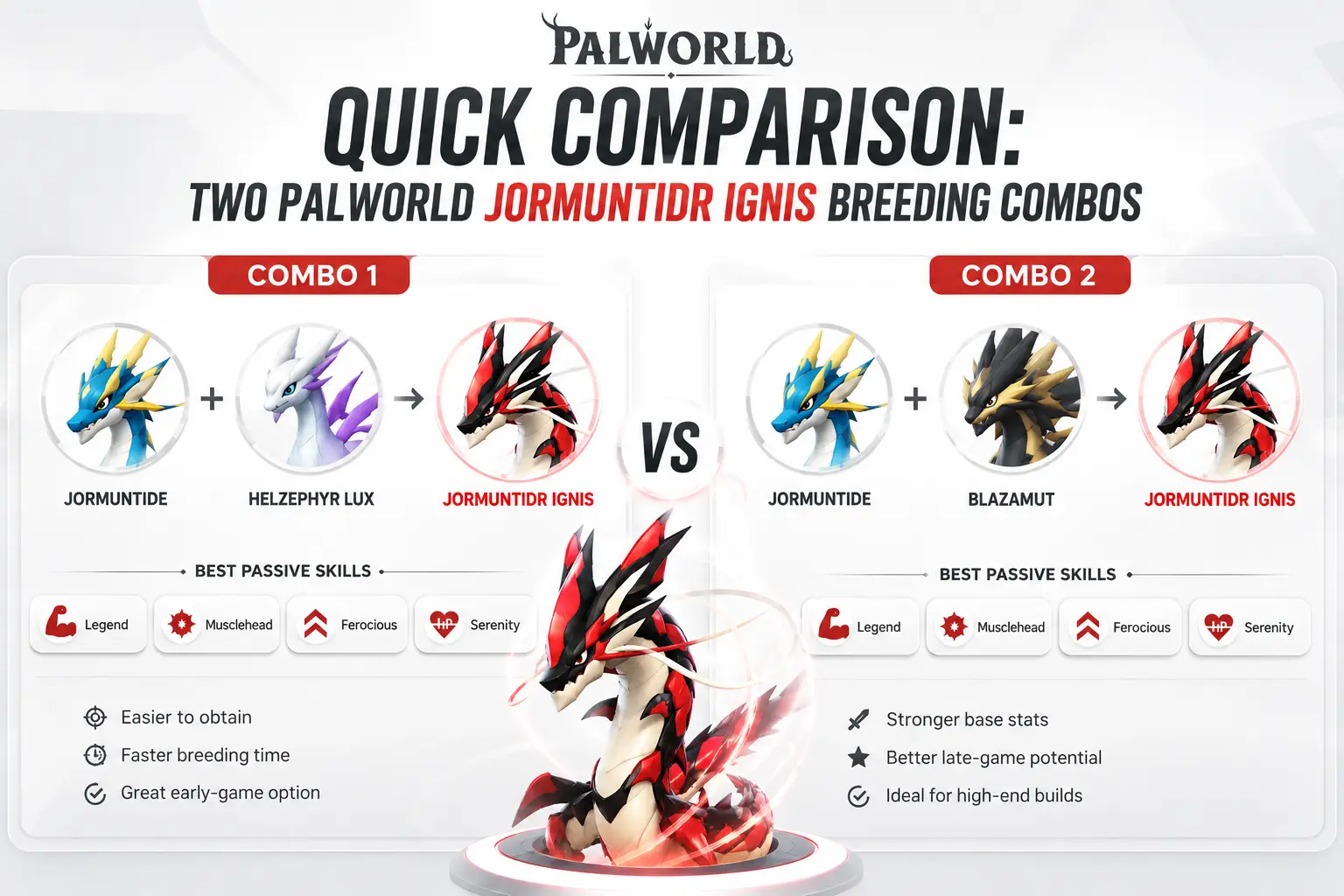
Quick Comparison: Two Palworld Jormuntide Ignis Breeding Combos
| Path |
Parents |
Best For |
| First-time route |
Blazehowl + Jormuntide |
Getting your very first Jormuntide Ignis |
| Passive-fishing route |
Jormuntide Ignis + Jormuntide Ignis |
Refining passives once you already have one |
The Decision Tree: Which Route Should You Take?
Answer honestly, because plenty of players waste a full evening by skipping this step. Most jormuntide ignis breeding palworld questions come down to one of these three situations.
• Don’t own a Jormuntide Ignis yet? Go catch or breed a Blazehowl and a Jormuntide. That’s your only realistic path in, and it’s the starting point for palworld breeding for jormuntide ignis from scratch.
• Already have one, but its passives are garbage? Skip the Blazehowl route entirely. Breed your existing Ignis with a second one (buy, catch, or breed a spare) and cycle eggs until you get something better.
• Just want a “good enough” one fast and don’t care about optimizing passives? Honestly, consider just catching one wild instead. It spawns at level 66 and up in Mt. Obsidian, and if your combat team can handle that level range, it might genuinely be faster than running two separate breeding chains back to back.
Where I'd Push Back on the “Just Breed a Ton” Advice
A lot of guides tell you to just spam eggs until you get lucky. That’s technically true, but it’s lazy advice, and it’s worth being a little more honest about jormuntide ignis breeding combos palworld players actually rely on.
Passive inheritance in Palworld isn’t a coin flip, it’s weighted. A child inherits somewhere between one and four passives from its parents, with the odds dropping off at roughly 40/30/20/10 depending on how many get passed down, and then it can additionally roll zero to three brand new random passives at that same declining rate. What that means practically: parent passive quality matters far more than raw egg quantity. If you’re breeding two Jormuntide Ignis with mediocre passives, you’ll mostly just get mediocre offspring, no matter how many eggs you crack open.
A smarter approach, the one worth adopting after burning through way too much cake early on, is keeping a dedicated “breeding pair” separate from the “working” Jormuntide Ignis that actually sits on your base or team. The breeding pair only gets swapped out when a hatch produces something with strictly better passives than what’s currently sitting in that slot. It’s slow and unglamorous, but it actually works, and it stops the temptation to keep every mediocre hatch just because it took resources to make.
Common Mistakes Worth Avoiding
A few things trip people up more than they should with jormuntide ignis palworld breeding, and most of them are avoidable with a five-minute check beforehand.
The biggest one is starting the breeding chain before the Breeding Farm is actually unlocked at Tech Level 19. Players assume they’ve hit that tier because they’ve logged enough hours, then discover they’re two or three levels short right when they try to place the farm.
The second is running out of Cake mid-chain. One Cake per egg sounds trivial until you’re six or seven eggs into a fishing session and suddenly your farm sits idle while you fly back to restock flour, eggs, and milk.
The third, and this one’s sneaky, is mixing up Jormuntide with Jormuntide Ignis when shopping the in-game Pal list or a breeding calculator. They look nearly identical in name and share a base model, so a rushed click can send you down the wrong chain entirely. Double-checking both names before confirming the pairing is the single easiest way to keep breeding palworld jormuntide ignis on track.
Checklist Before Breeding Jormuntide Ignis in Palworld
Run through this before committing resources:
☐ Breeding Farm built and at Tech Level 19
☐ Cake stocked in the attached chest, more than one, trust the process
☐ Blazehowl and Jormuntide caught, or an existing Jormuntide Ignis pair ready
☐ Egg Incubator free and available for the hatch
☐ A spot on your roster or in storage for the result
If every box is checked, the setup is genuinely ready. If the Jormuntide specifically is missing, that’s almost always the bottleneck, so handle that before touching anything else.
Try This Right Now
Before closing this tab, go check your Tech Tree level. Seriously, open it up. A lot of players assume they’ve unlocked Tech Level 19 Breeding Farms simply because they’ve been playing for hours, only to reach the farm menu and realize they’re two levels short. It saves a wasted trip, and it’s the one prerequisite every palworld ignis jormuntide breeding attempt trips over first.
FAQ
Can I skip Jormuntide entirely and use something else?
No. For the direct, single-cross route, Jormuntide is a required parent. There’s no shortcut that avoids catching or breeding one first.
Does gender matter for the Blazehowl and Jormuntide pairing?
No, either gender combination works for this cross.
Is it faster to just catch Jormuntide Ignis in the wild instead of breeding?
Sometimes, yes. It spawns wild at level 66 to 67, concentrated around Mt. Obsidian. If your team can handle that fight comfortably, catching one might genuinely beat the breeding chain, though you won’t have any control over its passives that way.
Will breeding two Jormuntide Ignis together ever fail and give me a regular Jormuntide instead?
No. That specific same-species pairing reliably produces another Jormuntide Ignis. The mix-up mentioned earlier only happens when unrelated Dragon or Fire-type Pals get used instead of the actual combo.
How many eggs should I realistically expect to hatch before getting good passives?
There’s no fixed number, since it’s weighted RNG rather than a guaranteed curve, but budgeting for somewhere in the range of six to twelve eggs for a genuinely strong passive spread is a reasonable expectation based on how the inheritance odds are structured.
Still have questions? Visit our Contact Us page, and we’ll be happy to help.
Gaming Musk Team creates gaming tools and practical guides for gamers. We build tools like PC requirement checkers, gamepad testers, and game-specific calculators while publishing easy-to-follow guides for games, gaming hardware, and performance optimization. Our goal is to help players make better gaming decisions with accurate tools and reliable information.
Xbox 360 Controller Not Working: Why It Happens and What Actually Fixes It
Picture this it’s late, you’ve finally got a couple hours free, and you sit down to finish a save file you left off two weeks ago. You hit the guide button. Nothing. You unplug the cable, plug it back in, and Windows makes that little chime like it recognizes something’s there, but the controller itself just sits dead in your hands. I’ve had that exact moment more times than I’d like to admit, usually right when I don’t have time to deal with it.
I’ve been pulling apart, rewiring, and stress-testing game controllers for a long time now — enough years that I’ve genuinely lost count of how many Xbox 360 pads have passed through my hands, wired and wireless both, sitting on a controller tester rig next to whatever GPU I happened to be benchmarking that week. Some died from age. A few died because I dropped a soldering iron near one that I really shouldn’t have been near. Most of the time, though, the fix behind an Xbox 360 controller not working was something small and dumb that took me way longer to find than it should have.
Quick Answer
Quick answer, no scrolling required:
If your Xbox 360 controller isn’t working, it’s almost always one of four things: dead batteries or a bad cable, a driver conflict in Windows, a wireless receiver that’s lost its pairing, or worn analog stick contacts. Start with the cable or batteries, then check Device Manager, then re-sync.
If none of that works:
and the controller shows up but won’t respond in-game, it’s probably a driver or deadzone problem, not a dead controller — skip ahead to the driver section before you give up on it.
Why This Actually Matters
A controller dying mid-session isn’t just annoying, it’s the kind of thing that makes people give up on perfectly fixable hardware and drop forty bucks on a replacement they didn’t need. I’ve watched people toss controllers that had one bent pin. Before you write yours off, it’s worth fifteen minutes to actually figure out which of the handful of common culprits you’re dealing with.
Xbox 360 Controller Not Working: The Usual Suspects
There’s no single reason this happens, but after years of testing these things I’d say it breaks down into a short list, and most people jump straight to “it’s broken” before checking the boring stuff first. Here’s roughly how I’d rank the likely causes, most common to least.
Cause | How Common | Quick Tell |
Dead batteries / bad cable | Very common | Controller won’t power on at all |
Driver conflict in Windows | Common | Shows in Device Manager, doesn’t respond in-game |
Lost wireless pairing | Common | Ring lights flash, never syncs |
Worn analog stick contacts | Less common | Drifting or dead zones during play |
Faulty USB port or receiver | Occasional | Works in one port, not another |
Quick gut-check before you keep reading go look at your controller right now. Wired or wireless? That one detail rules out about half the possibilities immediately, so it’s worth knowing before you start troubleshooting blind.
It Won't Power On at All
Start here, because it’s the fix nobody wants to hear and the one that actually works most often. Wireless pads eat batteries faster than people expect, especially with rumble left on. I’ve had testers swear a controller was dead, hand it to me, and watch me fix it in about four seconds with a fresh set of AAs. Slightly embarrassing for them. Happens constantly.
For wired controllers, the cable itself is the usual failure point, not the internals. These cables get yanked, stepped on, wound tight around a controller for storage the strain relief right where the cable meets the housing is exactly where I’ve seen the internal wires fray first. Try a different USB cable before you assume the controller’s dead. A cheap swap solves this more often than people expect.
Xbox 360 Controller Not Working in Windows: It Shows Up But Won't Respond
This one trips people up because it looks like the controller is working Windows chimes, Device Manager shows the device, maybe even the LED lights up but nothing happens when you press a button. Nine times out of ten in my experience, that’s a driver issue, not a hardware one.
Open Device Manager and look for a yellow warning icon next to “Xbox 360 Controller for Windows.” If it’s there, or if the device is listed as “Unknown Device,” the driver either failed to install properly or got knocked loose by a recent Windows update. Uninstall the device entirely, unplug the controller, restart, then plug it back in and let Windows reinstall it fresh. I know it sounds too simple. It fixes this problem more often than any other single step I’ve tried.
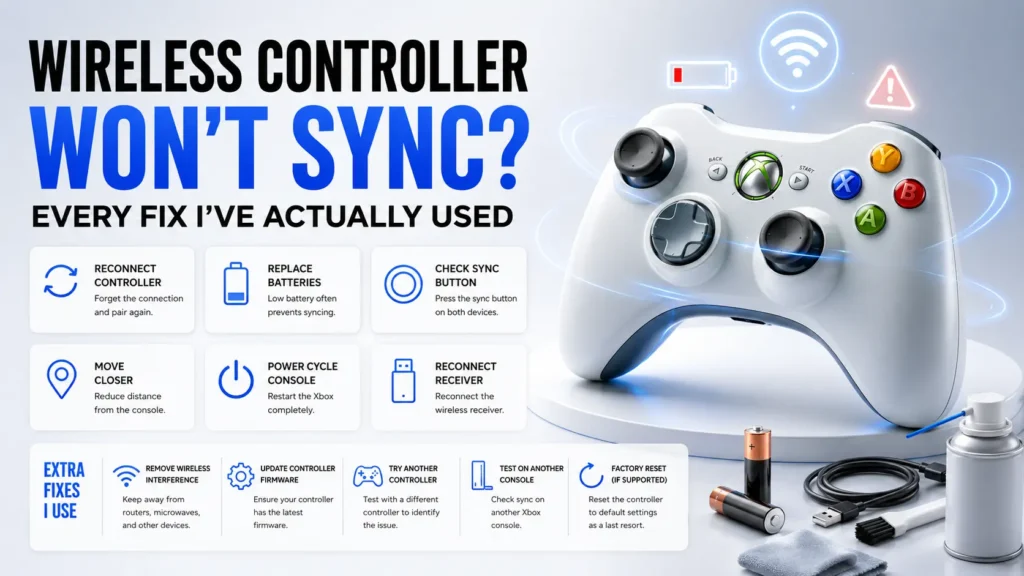
Wireless Controller Won't Sync
If you’re on the wireless model with the little USB receiver dongle, the sync process is finicky in a way that trips up even people who’ve done it before. Hold the small sync button on the controller until the ring lights start flashing in a rotating pattern, then hit the sync button on the receiver within about twenty seconds. Miss that window and you’ll be doing it again.
Here’s something I didn’t figure out for embarrassingly long the receiver and the controller have to be reasonably close, like within a few feet, during the sync process itself. Once they’re paired you get a lot more range, but during pairing, distance kills it. I spent a solid ten minutes once trying to sync a controller sitting across the room from the receiver before I felt dumb enough to move closer and have it just work.
Stick Drift or Dead Zones
If the controller powers on, syncs fine, shows up in Windows, but your character drifts sideways when you’re not touching the stick, that’s usually worn potentiometer contacts inside the stick housing not a software problem. This happens with age and heavy use, and it’s the one issue on this list that’s genuinely a hardware failure rather than a setup mistake.
• Light drift: try recalibrating in Windows game controller settings first, it’s free and takes thirty seconds.
Before assuming your controller has failed, test every button, trigger, and analog stick with our Game Controller Tester. It lets you check each input in real time, and you’ll quickly see whether the issue is caused by the controller or something else.
• Heavy drift or dead zones: the contacts are likely worn and calibration won’t fully fix it.
• If it’s a wired controller you don’t mind opening, cleaning the contacts with isopropyl alcohol sometimes buys you another year.
Where I'd Push Back on the Usual Advice
A lot of troubleshooting guides tell you to reinstall drivers as step one for everything. I don’t agree with that as a default. If your controller won’t power on at all, drivers are irrelevant you’re chasing the wrong problem and wasting time. Diagnose power first, connection second, software third. Doing it out of order is how people end up reinstalling drivers five times for a dead battery.
I’d also push back on immediately buying a new wireless receiver the second syncing fails. In my experience the actual receiver is rarely the culprit it’s almost always a sync timing issue or USB port conflict. Try a different USB port before you spend money on new hardware.
A Quick Decision Tree
Controller won’t power on at all? Check batteries or swap the USB cable first.
Windows sees it but games don’t respond? Go straight to Device Manager and reinstall the driver.
Wireless and won’t sync? Move closer to the receiver and redo the sync sequence within the time window.
Drifting or dead zones during play? Recalibrate first, then suspect worn stick contacts if that doesn’t help.
Works in one USB port but not another? It’s a port or receiver conflict, not a dead controller.
Test This Before You Give Up on It
Do this before you write the controller off as dead:
☐ Swap in a different USB cable or fresh batteries — rules out the most common cause in under a minute.
☐ Check Device Manager for a yellow warning icon or an “Unknown Device” entry.
☐ Try a different USB port on your PC, ideally directly on the motherboard, not through a hub.
☐ If wireless, redo the sync sequence with the receiver within a few feet of the controller.
☐ Test the sticks in Windows’ game controller calibration screen to confirm drift is real and not a game-specific setting.
So does that mean every unresponsive controller just needs a driver reinstall? Not exactly. If you’ve gone through the checklist above and it’s still dead, you’re probably looking at a genuine hardware fault a cracked solder joint, a fried USB chip inside the housing and at that point, unless you enjoy opening electronics with a screwdriver you shouldn’t be using, replacement is the more sensible move.
FAQ: What People Actually Ask Me
Why does my Xbox 360 controller work on one PC but not another?
Usually a driver mismatch this is the most common version of an Xbox 360 controller not working that I see reported. Older PCs sometimes still have the original driver installed, which behaves differently from the newer Xbox Accessories driver Windows pulls automatically now. Uninstall and let Windows reinstall it fresh on the PC giving you trouble.
Can a wireless Xbox 360 controller work on Windows 11?
Yes, as long as you’re using the official wireless receiver. Windows 11 handles it fine in my testing no different from Windows 10 in practice, despite what a few outdated forum posts claim.
Why does my controller randomly disconnect mid-game?
Almost always a wireless interference or power-saving issue. Check your USB selective suspend setting in Windows power options and disable it for that port it’s set to save battery on laptops and it’s notorious for kicking wireless receivers offline.
Is it worth repairing an old Xbox 360 controller instead of replacing it?
Depends what’s wrong with it. Stick drift or a cable issue, absolutely worth fixing cheap and quick. A dead motherboard inside the housing, not really worth your time unless you just enjoy tinkering, like I clearly do.
Do third-party Xbox 360 controllers have the same problems?
Mostly the same failure points, but I’ve found the cheaper ones fail faster at the stick contacts specifically. If you’re testing a bunch of controllers side by side like I do, the third-party ones are usually the first to show drift.
Still have questions? Visit our Contact Us page, and we’ll be happy to help.
Gaming Musk Team creates gaming tools and practical guides for gamers. We build tools like PC requirement checkers, gamepad testers, and game-specific calculators while publishing easy-to-follow guides for games, gaming hardware, and performance optimization. Our goal is to help players make better gaming decisions with accurate tools and reliable information.