You're in the final round. One shot left. You line up the perfect headshot... and your aim drifts to the left on its own. The shot misses. You lose the round wondering what just happened. That tiny, maddening drift isn't bad luck it's stick drift, and it's one of the most common controller problems gamers run into. The good news? You don't need to guess what's wrong. A game controller tester or sometimes called an online controller checker. Now you see exactly what your controller is doing, in real time, right inside your browser. Whether you're grinding ranked matches, racing online, or just want peace of mind before a big tournament, testing your controller takes less than a minute. No downloads, no installs, no technical confusion just connect and watch your inputs come to life on screen.
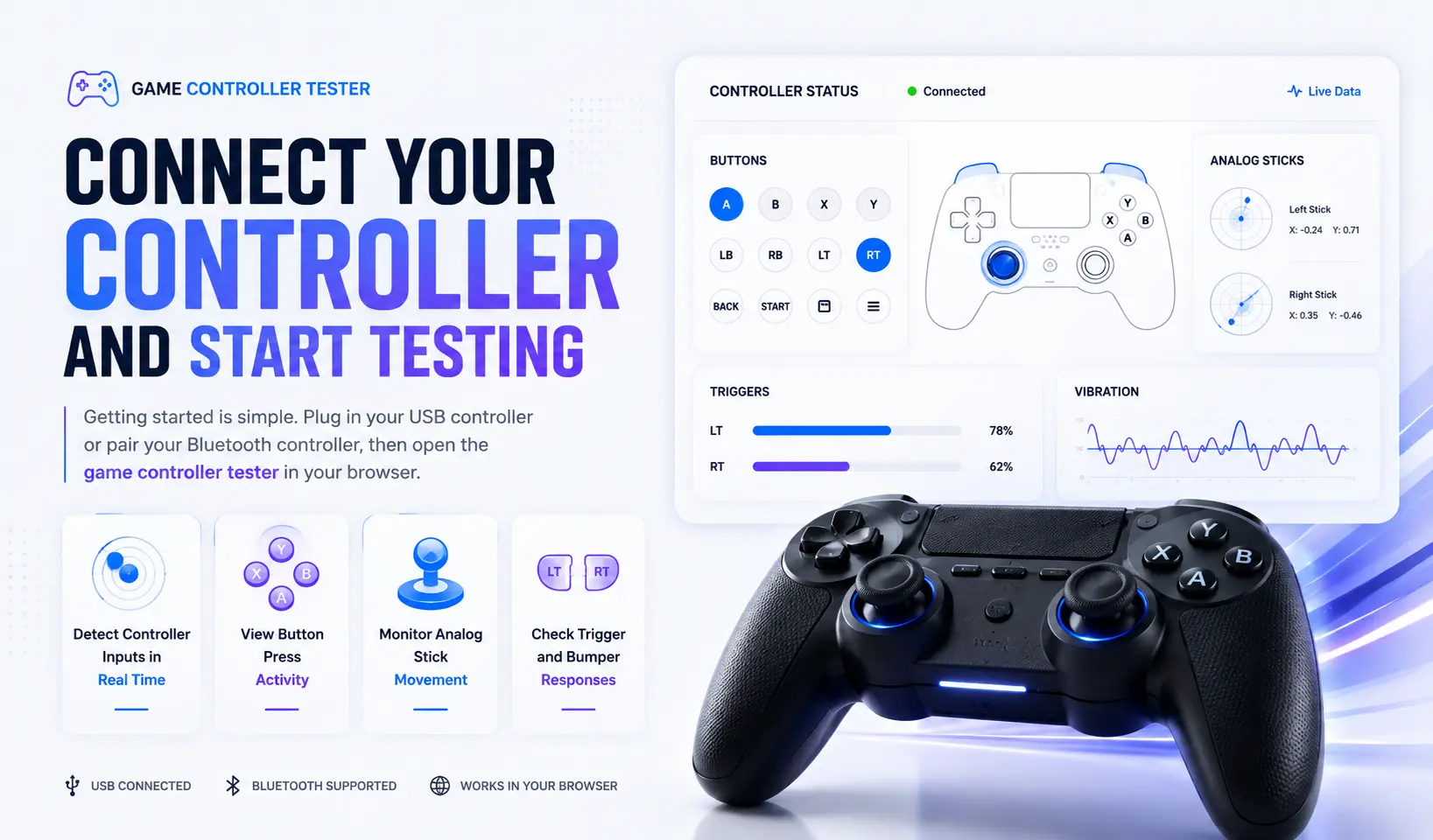
Connect Your Controller and Start Testing
Getting started is simple. Plug in your USB controller or pair your Bluetooth controller, then open the game controller tester in your browser. Most browsers detect gamepads instantly, so there's nothing extra to install.
Detect Controller Inputs in Real Time
Once connected, every input you make, including buttons, triggers, and sticks, appears on screen the moment you touch it. This first controller input test confirms that your controller connectivity is solid before you even load a game.
View Button Press Activity
Press any button and watch it highlight instantly. If a button lights up late, doesn't light up at all, or stays "stuck on," you've just found your problem.
Monitor Analog Stick Movement
Move your thumbsticks and watch a live cursor track the motion. This is the easiest way to spot stick drift, dead zones, or uneven response on either stick.
Check Trigger and Bumper Responses
Squeeze your triggers and tap your bumpers to see their response on a pressure scale. This shows you the real trigger response under pressure, not just a simple on/off signal.
People also search for
Game Controller Tester Features
A solid game controller tester does more than blink a few lights; it gives you a full picture of your controller's health.
Real-Time Input Visualization
Every press, pull, and tilt shows up instantly, so there's zero guesswork about what your controller is actually sending to your PC or console.
Controller Response Monitoring
Beyond detecting inputs, the tool tracks how quickly and consistently your controller responds. Think of it as a built-in controller latency test that flags delays before they cost you a match
Browser-Based Testing Tool
Everything runs directly in your browser. That means you can test controller online from a laptop, desktop, or even a friend's PC without setting anything up.
No Download or Installation Required
No software, no drivers, no waiting around. Open a tab, connect your controller, and you're testing within seconds
Gaming Controller Test
A gaming controller test is your quickest way to confirm everything is working before you jump into a match.
Verify Controller Functionality
Run through every button, stick, and trigger once to confirm your controller is fully operational, especially after a drop, a spill, or a long period of storage.
Test Every Button and Input
Don't just check the buttons you use often. Hidden issues love to hide in inputs you rarely press, like back paddles or the D-pad.
Check Controller Accuracy
Accuracy matters most in fast-paced games. A precise gaming controller test shows whether your inputs match your intentions, down to small movements.
Identify Hardware Issues
If something feels "off" but you can't quite explain it, a game controller tester is where you'll catch loose buttons, worn springs, or failing connections early.
People also search for
Joystick Tester
If your aim feels inconsistent, a joystick tester is where you start.
Test Analog Stick Precision
An analog stick test like this reveals small issues that are easy to miss with the naked eye. Slow, small movements should produce slow, small changes on screen.
Analyze Stick Movement Range
Push each stick to its full limit in every direction. The tracker should reach the very edge, no further and no less.
Detect Dead Zones
A deadzone is the small area around center where movement isn't registered. Too large a deadzone makes fine adjustments feel sluggish or unresponsive.
Check Axis Accuracy
Each stick moves along two axes X and Y , and checking both separately reveals issues hidden when you only test diagonal movement.
Stick Drift Test
If your character moves on its own when you're not touching anything, this section is for you.
Detect Unwanted Stick Movement
A proper stick drift test shows the resting position of your stick. If the cursor sits off-center with no input at all, that's drift.
Measure Drift Severity
Small drift might just need recalibration. Larger drift, where your character visibly walks, aims, or steers on its own, usually signals hardware wear.
Check Controller Calibration
Sometimes drift isn't damage, it's a calibration issue. Joystick calibration resets the center point and range, and can fix minor drift in seconds.
Identify Drift-Related Problems
Missed shots in shooters, cars that won't drive straight in racing games, and characters that wander in open-world titles are all classic signs of drift.
People also search for
Controller Test
A general controller test ties everything together into one quick health check.
Check Button Registration
Every press should register exactly once. Double inputs or missed presses during combos point to a button registration problem.
Verify Input Response Time
This checks how fast your input reaches the game, which is critical in fighting games, where a few milliseconds can decide whether a combo lands.
Test Directional Pad Accuracy
Tap each direction on the D-pad individually, then quickly in sequence, to make sure none of the directions stick or overlap with each other.
Confirm Controller Health Status
Once every input checks out clean, you'll know your controller is ready for ranked play, not just casual sessions.
Gamepad Tester
Think of a game controller tester as your controller's diagnostic dashboard.
Run a Full Gamepad Diagnostic
This runs through buttons, sticks, triggers, and the D-pad in one pass, giving you complete game controller diagnostics and acting as a full gamepad input checker for every signal your device sends.
Test Connected Devices
If you have multiple controllers plugged in, the tester can show which one is active, which is handy for couch co-op setups.
Analyze Input Mapping
Gamepad mapping shows which physical button corresponds to which input signal, which is useful if your buttons feel "swapped" in-game.
Validate Controller Performance
After testing, you'll have a clear picture of overall controller performance, from button feel to stick precision and trigger response.
People also search for
Button Test and Input Checker
This is where you put every input through its paces.
Face Button Testing
A thorough controller button test covers every face button individually and in combination. Watch for buttons that don't light up or that trigger another button's input.
D-Pad Functionality Check
Your directional pad relies on separate switches for each direction and diagonal. Worn D-pads often miss diagonal inputs first.
Shoulder Button Testing
Tap your bumpers repeatedly to check for consistent registration, which is important for rapid actions like reloading or switching weapons.
Multi-Button Input Detection
Hold several buttons at once. If pressing one cancels another, you may have a wiring or chip-level issue worth getting checked.
How to Use the Controller Testing Tool
Here's the simple step-by-step process for using a game controller tester.
Connect Your Controller
Plug in via USB or pair via Bluetooth before opening the tester in your browser.
Allow Browser Detection
Press any button once connected; most browsers need a single input to "wake up" and recognize the gamepad.
Perform Input Checks
Work through buttons, sticks, triggers, and the D-pad systematically, rather than mashing everything at once.
Review Test Results
Note anything that didn't respond correctly, then move on to troubleshooting based on what you found.
Common Controller Issues
Here's what usually goes wrong, and what it means.
Controller Not Detected
Often a loose USB connection, a Bluetooth pairing issue, or a browser that needs an initial input to recognize the gamepad.
Buttons Not Responding
Could be debris under the button, a worn switch, or a software-level mapping conflict.
Stick Drift Problems
Usually caused by worn components inside the stick module. Recalibration helps minor cases, but severe drift often needs repair.
Calibration Errors
If your center point is off, recalibrating through your system settings or the tester itself can resolve small inaccuracies.
People also search for
Controller Glossary
Quick definitions for the terms you'll see most often.
Stick Drift
Unwanted movement registered by an analog stick when it's not being touched.
Deadzone
The small area around a stick's center where input isn't registered, designed to prevent accidental drift.
Polling Rate
How often your controller sends input data to your device, with a higher polling rate generally meaning lower input lag.
Input Lag
The delay between pressing a button and seeing the result happen on screen.